

Microsoft Office 2021 Pro Plus FPP Download
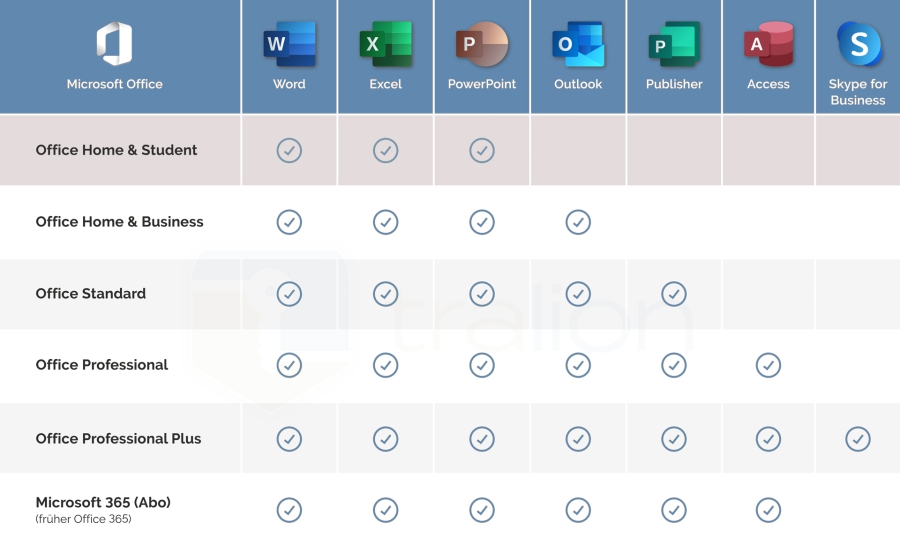
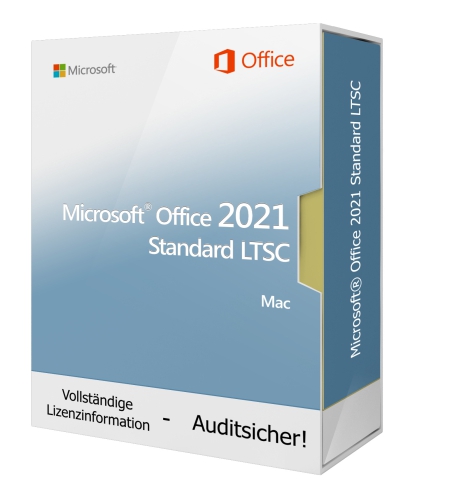
The Microsoft Office 2021 Standard software suite includes the Office programs Word 2021, Excel 2021, PowerPoint 2021, Outlook 2021 and Publisher 2021. The digital notebook OneNote is also part of the Office suite. With these programs you can effortlessly create documents, perform calculations, design presentations, manage emails and create publications.


Also available:
Delivery time: 0-15 min.
Over 2.500 sold already


100% secure payment
Purchase the software you want easily and securely thanks to SSL encryption in our shop.
Lightning-fast delivery
Email delivery and instant download within 5–30 minutes.
Installation assistance
We offer free assistance via TeamViewer for your initial installation.
Free support
Via chat, phone or email
Microsoft Office 2021 Standard ? the software collection with efficient office programs
The features of Microsoft Office 2021 Standard at a glance:
- Includes Word 2021, Excel 2021, PowerPoint 2021, Outlook 2021 and Publisher 2021
- Includes the digital notebook OneNote
- Improved performance across all Office programs
- Additional Accessibility ribbon
- New features in Excel 2021
- Support for OpenDocument Format (ODF) 1.3
- Microsoft Search box for better search results
- Redesigned comments pane
The software collection Microsoft Office 2021 Standard contains the Office programs Word 2021, Excel 2021, PowerPoint 2021, Outlook 2021 and Publisher 2021. The digital notebook OneNote is also part of the Office suite. With these programs you can effortlessly create documents, perform calculations, design presentations, manage emails and produce publications.
FAQs:
Which Office programs are included with Office 2021 Standard?
With the Microsoft Office 2021 Standard license you acquire the Office programs Word 2021, Excel 2021, PowerPoint 2021, Outlook 2021 and Publisher 2021. In addition, you can create and maintain digital notebooks with OneNote.
How does Office 2021 Standard improve team collaboration?
If you buy Microsoft Office 2021 Standard, you get several new features aimed at improving team collaboration. These include co-authoring (simultaneous document editing) and improved commenting functions.
What tasks can be accomplished with the Office 2021 Standard programs?
With the applications in Microsoft Office 2021 Standard you can, among other things, create documents, perform calculations, design presentations, manage emails and produce publications. In addition, you can create charts, analyze data, design brochures and perform many other tasks.
Purchase Office 2021 Standard and use a feature-rich software suite
Both at home and in the office there are a variety of different tasks to master that today require professional software. If you purchase Microsoft Office 2021 Standard, you receive a practical software collection with the applications Word 2021, Excel 2021, PowerPoint 2021, Outlook 2021 and Publisher 2021. In addition, you can create and maintain digital notebooks with OneNote. Each program offers individual advantages and is designed to solve specific tasks. From word processing with Word 2021 to spreadsheets with Excel and presentation creation with PowerPoint 2021, countless functions are available for efficient work. While Outlook 2021 allows comfortable management of emails, tasks and calendars, Publisher 2021 enables the creation of professional printed materials and digital publications. If you buy Microsoft Office 2021, you get mature software solutions that offer numerous improvements and innovations compared to the previous version.
For numerous innovations: Buy Microsoft Office 2021 Standard online
Microsoft Office 2021 Standard includes new features for co-authoring documents in real time, translation and editing tools, animation graphics, inking tools, data types and much more. As soon as Office files are stored in OneDrive, SharePoint or Teams, they can be edited simultaneously by multiple people. It does not matter whether an online app or a desktop app is used. If you buy Microsoft Office 2021 Standard, you therefore benefit from more efficient team collaboration. The Microsoft Office 2021 Standard license comes with several improvements to the commenting features. For example, in PowerPoint 2021 users can now better see which comment refers to which element. Thanks to this Office 2021 feature, a cumbersome exchange via e?mail about desired changes is no longer necessary. After downloading Microsoft Office 2021 you will benefit from significant time savings in many areas.
Buy Microsoft Office 2021 Standard and overcome barriers
In Excel 2021 you have a new Accessibility ribbon that helps you create accessible Excel workbooks more easily. The Office program provides various suggestions for accessible presentation of data and also supplies practical tools. If you buy Microsoft Office 2021 Standard, obstructive barriers belong to the past. In Word 2021, Excel 2021, PowerPoint 2021, Outlook 2021 and Publisher 2021 you can expect numerous improvements that make everyday office work much more comfortable. If you buy Microsoft Office 2021 Standard, you can use new recording features in PowerPoint 2021. It is now possible to record a screen presentation with comments and slide timings. With the Microsoft Office 2021 Standard license it is even possible to save a presentation as a video file. If you purchase Microsoft Office 2021 Standard cheaply from our shop, you can create presentations even more flexibly as a result.
| System requirements | |
|---|---|
| Processor | 1.6 gigahertz (GHz) or faster, 32?bit (x86) or 64?bit (x64) processor |
| Operating systems  | Windows 10, Windows Server 2019 Windows 11, Windows Server 2021 (other Windows versions are not supported) |
| Memory | min. 2 GB RAM |
| Hard disk space | min. 3 GB available storage |
| Display | min. 1024 * 768 pixels |
| (For more detailed information please refer to the manufacturer)Â office.com/systemrequirements. | |
| System requirements | |
|---|---|
| Processor | 1.6 GHz or faster, 2?core processor |
| Display | 1280 × 768 screen resolution |
| Memory | 4 GB RAM (64?bit) or 2 GB RAM (32?bit) |
| Hard drive space | At least 4 GB available storage |
| Graphics | DirectX 12?compatible graphics card with WDDM 2.0 driver (for Windows 11/10) |
| (Full technical details can be found on the Microsoft website) | |
How do I receive the license key and download link?
This product is a download version. Within 15 minutes after payment is received you will receive the license key and the download link by email. The product can then be downloaded, installed and activated online immediately.
This offer is intended for commercial customers only. Private users, please choose an Office Home & Student, Home & Business or Professional version.
Product safety details
Responsible person for the EU
Responsible for this product is the economic operator based in the EU:
Microsoft Ireland Operations Limited
One Microsoft Place
D18 P521 Leopardstown, Dublin 18
Ireland
https://support.microsoft.com/contactus
Attention: By clicking this link/these links you leave tralion.de and go to an external website. Please note that we are not responsible for their content.
You can also find the responsible economic operator for the product on the product itself, its packaging or in a document accompanying the product.